Platform overview
AI4EOSC provides a comprehensive platform for artificial intelligence and machine learning applications for scientific usecases. The project offers a federated computing infrastructure and shared services that enable researchers, developers, and organizations to collaborate on AI model development, training, and deployment at scale.
A note on terminology
AI4OS is the name of the software stack described in this documentation.
AI4EOSC is the project that initially developed that stack and is currently maintaining it. AI4EOSC also host a particular deployment of the AI4OS stack components (under cloud.ai4eosc.eu). For example:
The Dashboard deployed as the AI4EOSC Dashboard,
The Storage deployed as the AI4EOSC Storage,
etc.
In this regard, it is similar to other projects who have adopted the AI4OS Stack, like iMagine who deployed it’s own version of the AI4OS Dashboard as the iMagine Dashboard.
To reduce duplicities and lower the entry barrier for external projects, many AI4OS components deployed by AI4EOSC (e.g. the CI/CD pipeline or the Login) also serve others projects, like iMagine.
Components
There are several different components in the AI4OS/AI4EOSC stack that are relevant for the users. Later on you will see how each different type of user can take advantage of the different components.
Dashboard
The Dashboard allows users to access computing resources to deploy, perform inference and train AI modules. The Dashboard simplifies the deployment and hides some of the technical parts that most users do not need to worry about.
AI modules
The AI modules are developed both by the platform and by users. For creating modules, we provide the AI Modules Template as a starting point. Every AI module of the platform exposes it’s functionality under a common API, so that models can be accessed in a consistent way.
In addition to AI modules, the Dashboard also allows to deploy tools (eg. a Federated Server).
Training infrastructure
The Dashboard allows to deploy AI models in a federated computing infrastructure, based on Nomad. Each supported project can bring their own computing resources that can either be used exclusively by project members or shared with other projects.
Those are the datacenters that are currently part of the federation:
Inference infrastructure
The inference infrastructure, based on OSCAR, allows users to deploy trained AI modules in serverless mode. It supports horizontal scalability, quickly adapting to peaks in demand. Users can also compose those modules in complex AI workflows.
Other non-serverless deployment options are available, including deploying in external clouds.
The Storage
Storage is is connected transparently to deployments, so that users can train AI modules on their custom data.
Architecture overview
If you are curious, this is a very high level architecture overview of the platform:
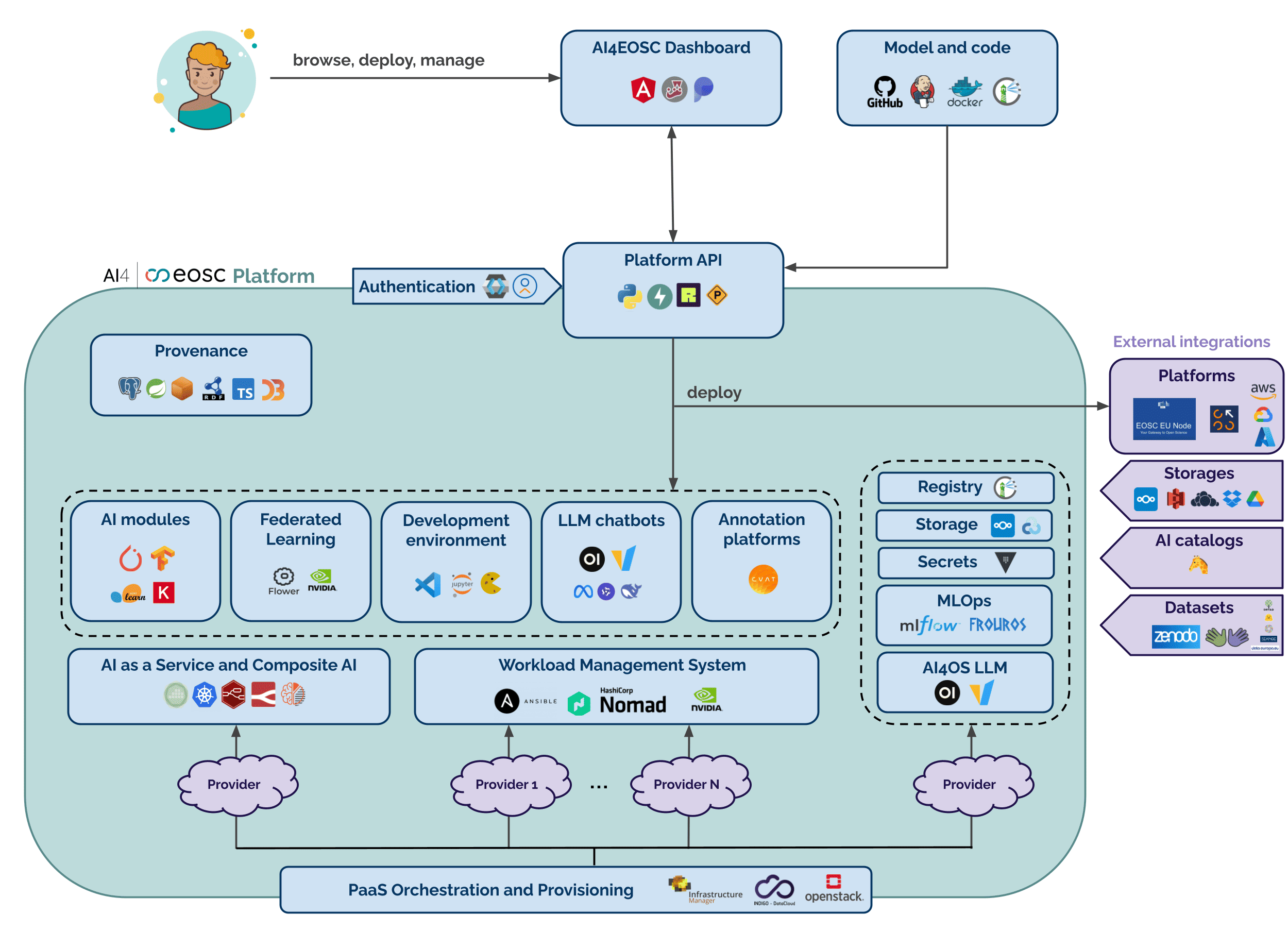
And if you are feeling super-nerdy 🤓️, these are the low-level C4 architecture diagrams of the platform.
Our different user roles
The platform is focused on three different types of users. Depending on what you want to achieve you should belong into one or more of the following categories:
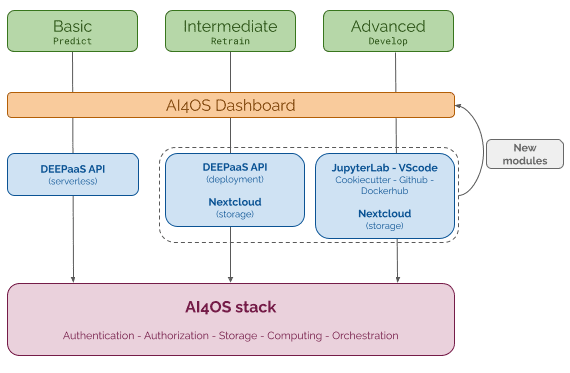
The basic user
This user wants to use modules that are already pre-trained and test them with their data. Therefore, they don’t need to have any particular machine learning knowledge. For example, they can take an already trained module for plant classification that has been containerized, and use it to classify their own plant images.
What the platform can offer to you:
a Dashboard full of ready-to-use modules to perform inference with your data,
a GUI to easily interact with the services,
an API to integrate the AI modules with your own services,
solutions to run the inference in the Cloud or in your local resources,
the ability to create pipelines by composing different modules.
The intermediate user
The intermediate user wants to retrain an available module to perform the same task but fine-tuning it to their own data. They still might not need high level knowledge on modelling of machine learning problems, but typically do need basic programming skills to prepare their own data into the appropriate format. Nevertheless, they can re-use the knowledge being captured in a trained network and adjust the network to their problem at hand by re-training the network on their own dataset. An example could be a user who takes the generic image classifier model and retrains it to perform plant classification.
What the platform can offer to you:
the ability to train out-of-the-box a module of the Dashboard,
the ability to easily connect your training to your dataset hosted on our data storage resources,
a private instance of Computer Vision Annotation Tool (CVAT) to annotate your dataset,
a private server to create Federated Learning trainings with Flower,
the ability to use GPUs to accelerate your training,
an API to easily interact with the model,
solutions to deploy your developed model in the Cloud or in your local resources,
the ability to share your module with other users in the Dashboard Marketplace.
Related HowTo’s
The advanced user
The advanced users are the ones that will develop their own machine learning models and therefore need to be competent in machine learning. This would be the case for example if we provided an image classification model but the users wanted to perform object localization, which is a fundamentally different task. Therefore they will design their own neural network architecture, potentially re-using parts of the code from other models.
What the platform can offer to you:
a ready-to-use IDE (VScode, Jupyterlab) with the main DL frameworks (Pytorch, Tensorflow) running on different types of hardware (CPUs, GPUs),
the ability to easily connect your environment to your dataset hosted on our data storage resources,
the ability to integrate experiment tracking with MLflow in your trainings,
tutorials on performing different types of trainings (incremental learning, distributed learning)
the ability to use GPUs to accelerate your development,
the possibility to integrate your module with the API to enable easier user interaction,
solutions to deploy your developed model in the Cloud or in your local resources,
the ability to share your module with other users in the Dashboard Marketplace.
Related HowTo’s